
FIRE retires on December 31, 2026, but November 19 is the last day filers can actually submit through FIRE. Starting with Tax Year 2026, every federal information return you file electronically goes through IRIS, the IRS Information Returns Intake System. FIRE will not be available as a backup.
This is more than a new login. FIRE was a file transfer system built around 1980s architecture. IRIS checks the content of your data when you submit, sends results back at the record level, and expects a clear chain of accountability from data creation through correction. The way you prepare, transmit, review, and correct 1099s changes with it.
This guide covers what is different, what it means for your workflow, and what to do before your first IRIS filing season opens.
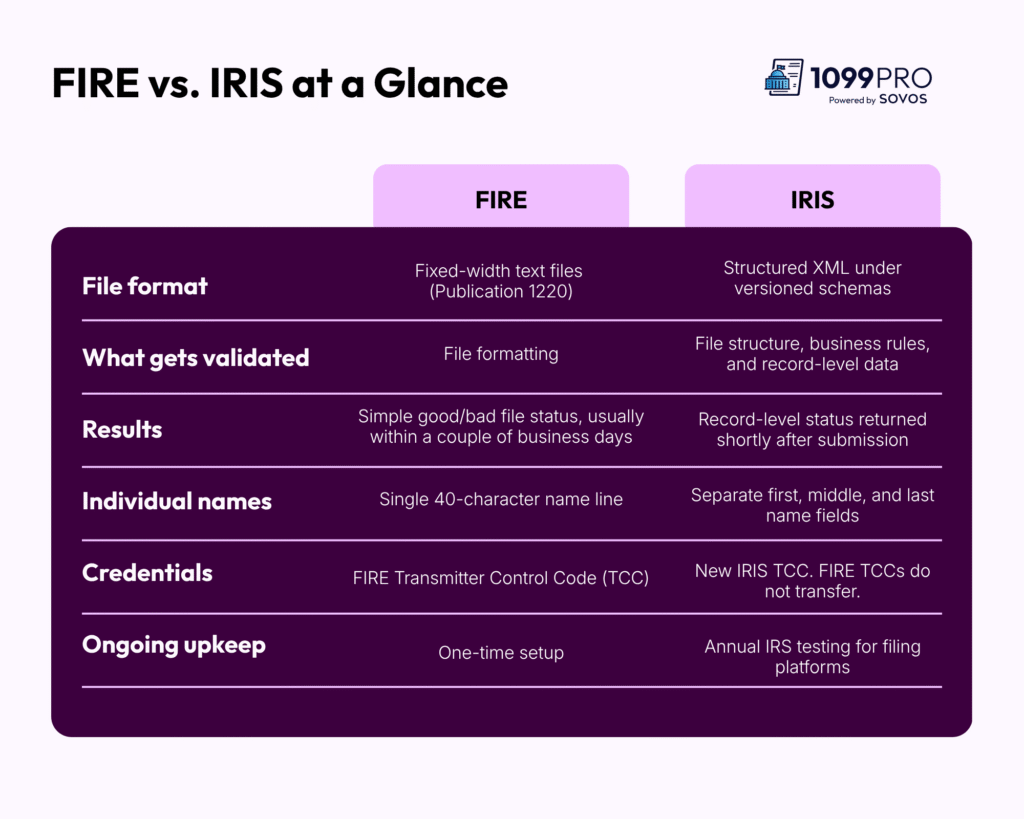
Four Technical Differences That Affect Your Filing
1. XML replaces fixed-width text files
FIRE accepted position-based text files in the Publication 1220 format. Each field sat in a set character position, and many teams built exports around that layout years ago.
IRIS uses structured XML. Every piece of data sits in a labeled field, in a set order, under a schema the IRS updates each year. Elements out of sequence, empty tags for optional fields, or an outdated schema version can cause a rejection.
What to do: Confirm whether your current system or provider generates IRIS-compliant XML and updates it every time the IRS releases a new schema.
2. Validation moves from your file to your data
Under FIRE, errors surfaced weeks later. Under IRIS, many surface at submission.
FIRE mostly checked whether your file was formatted correctly. Name/TIN mismatches and other data problems often showed up later as B-notices. IRIS validates your data when you file and returns detailed results quickly. Each submission receives one of four statuses:
- Accepted: The records were filed with no issues.
- Accepted with Errors: The records count as filed, but specific errors, such as Name/TIN mismatches, still need correction.
- Partially Accepted: Some records were accepted and others were not.
- Rejected: The submission failed and was not filed.
What to do: Assign clear ownership for each status before filing season. Someone on your team should know who reviews results, who resolves flagged records, and how fast each issue needs to be fixed.
3. Individual names need separate fields
FIRE stored individual names in a single line. IRIS requires separate first name, middle name or initial, and last name fields. Business names have their own fields too.
If your ERP or AP system stores names in one field, you will need to split them before you file. Hyphenated names, multiple last names, and missing middle initials make this harder than it looks.
What to do: Check how your system stores vendor and contractor names now. Fix the source data instead of parsing names at the last minute.
4. IRIS requires its own TCC
Your FIRE TCC does not carry over. Filing directly through IRIS requires a new IRIS TCC, and the application can take up to 45 days to process. Building a direct Application-to-Application (A2A) connection also requires a multi-step IRS approval process, a commercial security certificate, a custom API client, and annual IRS testing.
The free IRIS Taxpayer Portal avoids some of that setup, but it is built for small filers. Uploads are capped per submission, and corrections are entered by hand. For teams filing hundreds or thousands of forms, it does not scale.
What to do: Decide your filing path now. If you plan to file directly, apply for your IRIS TCC well ahead of January. If you would rather skip that setup, choose an IRIS-ready provider that transmits for you.
What Changes in Your Filing Workflow
IRIS changes each stage of the filing process. Here is how the work shifts.
- Prepare. Validate data before it leaves your system. Separate name fields, confirm TIN types, and run Name/TIN matching against IRS records. IRIS limits the “unknown” TIN type placeholders that FIRE allowed.
- Submit. Send structured XML through an approved, IRS-tested platform. The system that generates and transmits your file must align with the approved transmitter’s IRS registration.
- Review. Read record-level results soon after you file. Route each status to the right owner and track resolution.
- Correct. Store the identifiers IRIS returns for every accepted record, including the Receipt ID and Record ID. You need them to correct individual records later. Without them, corrections become far harder.
This shift also gives finance leaders something FIRE never did: a clearer audit trail. Record-level results show exactly what was filed, what was flagged, and what was fixed.
The Cost of Bad Data Under IRIS
Bad data is now more visible, and it is visible sooner. Incorrect or incomplete information returns carry IRS penalties of up to $340 per return. Across a large vendor or contractor list, a small error rate adds up fast.
Two risks stand out:
- Schema rejections have no grace period. Under FIRE, a bad file could be replaced within a 60-day window. Under IRIS, a submission that fails schema validation is rejected outright. You resubmit it as an original, and the filing date resets. A rejected file resubmitted after the deadline counts as late.
- “Accepted with Errors” still means work. These records are filed, but the errors attached to them still need correction. Mismatches that once arrived months later as B-notices now land on your desk during filing season.
Clean data is your best defense. Verify Name/TIN combinations year-round, not only in January.
Your Pre-Season Checklist
Use the weeks before December 31 to close out FIRE and prepare for IRIS.
- File outstanding FIRE corrections. Returns originally filed through FIRE currently need to be corrected through FIRE. Clear any open corrections before the system retires.
- Back up prior-year FIRE data. Export and store it securely. You may need it once the IRS finalizes how FIRE-filed returns will be corrected after retirement.
- Run a bulk TIN match. Find mismatches now while you still have time to collect updated W-9s.
- Fix name fields at the source. Separate first, middle, and last names in your vendor and contractor records.
- Confirm your filing path. Choose between a direct IRIS connection, the portal, or an IRIS-ready provider.
- Plan for state filing. Federal filing moves to IRIS, but states are moving at different speeds. Confirm each state’s requirements for your filing list.
How 1099Pro Cloud Handles the IRIS Transition
You don’t need to build your own IRS integration to file under IRIS. 1099Pro Cloud gives finance and tax teams one platform to import, validate, eFile, and deliver 1099s, W-2s, and 1042-S forms. Enterprise-grade information reporting without enterprise complexity.
1099Pro Cloud is IRIS-ready, and Sovos is an approved IRS Modernized eFile provider. That means:
- No IRIS TCC needed. You skip the TCC application, A2A registration, security certificates, and IRS communication testing.
- XML handled for you. The platform formats your data to the current IRIS schema and updates automatically as IRS requirements change.
- Errors caught before you file. Real-time and bulk TIN matching are included in your subscription, so you find Name/TIN mismatches before they reach the IRS.
- One workflow from intake to delivery. Import data with built-in templates and auto-mapping, eFile with the IRS, report to states, and deliver recipient forms by print, mail, or eDelivery.
- Simpler corrections. A built-in corrections workflow helps you fix flagged records without rebuilding files.
- Room for your whole team. Unlimited users and payers let tax, AP, and finance work in one system.
November 19 is the last day you can file through FIRE. After that, IRIS is your only path forward. Choose your filing solution now so your first IRIS season starts with clean data and a clear process.